Background jobs that scale
The open source message queue for Redis™, trusted by thousands of companies processing billions of jobs every day. Available for Node.js, Bun, Python, Elixir, and PHP.
import { Queue } from "bullmq";const queue = new Queue("Paint");
await queue.add("cars", {
  color: "blue",
  delay: 30000
});
from bullmq import Queuequeue = Queue("Paint")
await queue.add("cars", {
    "color": "blue",
    "delay": 30000
})
{:ok, job} = BullMQ.Queue.add(
  "Paint", "cars", %{color: "blue"},
  connection: :redis,
  delay: 30_000
)
use BullMQ\Queue;$queue = new Queue("Paint");
$job = $queue->add("cars", [
"color" => "blue",
"delay" => 30000
]);
import { Worker } from 'bullmq';const worker = new Worker('Paint', async job => {
  if (job.name === 'cars') {
    await paintCar(job.data.color);
  }
}, { concurrency: 100 });
from bullmq import Workerasync def process(job, token):
if job.name == "cars":
await paint_car(job.data["color"])
worker = Worker("Paint", process, {
"concurrency": 100
})
defmodule MyWorker do
  def process(%BullMQ.Job{name: "cars", data: data}) do
    paint_car(data["color"])
    {:ok, %{painted: true}}
  end
end{:ok, _worker} = BullMQ.Worker.start_link(
  queue: "Paint",
  connection: :redis,
  processor: &MyWorker.process/1,
  concurrency: 100
)
Trusted by teams worldwide
8.9K
GitHub Stars
5.9M+
Weekly Downloads
MIT
License
Multi-Language
Available for Node.js, Bun, Python, Elixir, and PHP — use the same queues across your entire stack.
Truly Open Source
MIT licensed, without any artificial limitations on the number of workers or concurrency.
Adding Jobs
0 jobs/sec
Processing Jobs
0 jobs/sec
* Benchmarks performed with DragonflyDB. See adding jobs and processing jobs benchmarks.
Scales Horizontally
Run thousands of workers across unlimited servers with minimal configuration
Redis & Beyond
Works with Redis, Valkey, DragonflyDB, AWS ElastiCache, Upstash and more
Delayed Jobs
Schedule jobs for later
Process jobs at a specific time or after a delay. Perfect for reminders, scheduled emails, or any time-sensitive task.
- Millisecond precision timing
- Survives server restarts
- Timezone-aware scheduling
Now
Send email +5 min
Reminder +4 hours
Report +1 day
Job Schedulers
Recurring jobs made easy
Create job factories that produce jobs on a schedule. Use cron expressions, fixed intervals, or custom patterns. Perfect for recurring tasks, reports, and maintenance jobs.
- Cron expressions
- Fixed intervals
- Upsert semantics
- Job templates
Yesterday 9:00
Today 9:00
Tomorrow 9:00
+2 days
Auto Retry
Failures are temporary
Jobs automatically retry with exponential backoff. Configure attempts, delays, and custom backoff strategies.
- Exponential backoff
- Custom retry strategies
- Dead letter queues
1
2
3
Automatic retry with backoff
Job Flows
Complex dependencies
Create parent-child job relationships with unlimited nesting depth. Build complex hierarchies where children run in parallel and parents wait for all dependencies to complete.
- Unlimited nesting depth
- Parallel execution
- Failure propagation strategies
- Result aggregation
Ship Order
Warehouse
Notify
Pick
Pack
Label
SMS
Flow Control
Protect your APIs
Safeguard external services with rate limiting per queue or group. Deduplicate jobs to implement debounce and throttle patterns.
- Per-second/minute/hour rate limits
- Deduplication for debounce & throttle
- Group-based rate limiting Pro
Rate Limit
max N/t
Throttle
1 per t
Node.js
Bun
Python
Elixir
PHP
import { QueueEvents } from "bullmq";const queueEvents = new QueueEvents("Paint");
queueEvents.on("completed", ({ jobId }) => {
console.log(`Job ${jobId} completed`);
});
queueEvents.on("failed", ({ jobId }, err) => {
console.log(`Job ${jobId} failed`);
});
from bullmq import QueueEventsqueue_events = QueueEvents("Paint")
async def on_completed(job, result):
print(f"Job {job['jobId']} completed")
async def on_failed(job, err):
print(f"Job {job['jobId']} failed")
queue_events.on("completed", on_completed)
queue_events.on("failed", on_failed)
# Events via Worker callbacks
{:ok, _worker} = BullMQ.Worker.start_link(
  queue: "Paint",
  connection: :redis,
  processor: &MyWorker.process/1,
  on_completed: fn job, result ->
    IO.puts("Job #{job.id} completed")
  end,
  on_failed: fn job, reason ->
    IO.puts("Job #{job.id} failed")
  end
)
import { Queue } from 'bullmq';const queue = new Queue('Paint');
// Repeat job once every day at 3:15 (am)
await queue.add(
'submarine',
{ color: 'yellow' },
{
repeat: {
pattern: '* 15 3 * * *',
},
},
);
from bullmq import Queuequeue = Queue("Paint")
# Repeat job once every day at 3:15 (am)
await queue.add(
"submarine",
{"color": "yellow"},
{
"repeat": {
"pattern": "* 15 3 * * *"
}
}
)
# Repeat job once every day at 3:15 (am)
{:ok, job} = BullMQ.Queue.add(
  "Paint", "submarine", %{color: "yellow"},
  connection: :redis,
  repeat: %{pattern: "* 15 3 * * *"}
)
use BullMQ\Queue;$queue = new Queue("Paint");
// Repeat job once every day at 3:15 (am)
$job = $queue->add(
"submarine",
["color" => "yellow"],
[
"repeat" => [
"pattern" => "* 15 3 * * *"
]
]
);
import { Worker } from 'bullmq';const worker = new Worker(
  'Paint',
  async job => paintCar(job),
  {
    limiter: {
      max: 10,
      duration: 1000,
    },
  }
);
from bullmq import Workerasync def process(job, token):
await paint_car(job)
worker = Worker("Paint", process, {
"limiter": {
"max": 10,
"duration": 1000
}
})
{:ok, _worker} = BullMQ.Worker.start_link(
  queue: "Paint",
  connection: :redis,
  processor: fn job -> paint_car(job); {:ok, nil} end,
  limiter: %{max: 10, duration: 1000}
)
import { Queue } from 'bullmq';const queue = new Queue('Paint');
await queue.add(
'car',
{ color: 'pink' },
{
attempts: 3,
backoff: {
type: 'exponential',
delay: 1000,
},
},
);
from bullmq import Queuequeue = Queue("Paint")
await queue.add(
"car",
{"color": "pink"},
{
"attempts": 3,
"backoff": {
"type": "exponential",
"delay": 1000
}
}
)
{:ok, job} = BullMQ.Queue.add(
  "Paint", "car", %{color: "pink"},
  connection: :redis,
  attempts: 3,
  backoff: %{type: :exponential, delay: 1000}
)
use BullMQ\Queue;$queue = new Queue("Paint");
$job = $queue->add(
"car",
["color" => "pink"],
[
"attempts" => 3,
"backoff" => [
"type" => "exponential",
"delay" => 1000
]
]
);
import { FlowProducer } from "bullmq";const flow = new FlowProducer();
await flow.add({
name: "Renovate",
queueName: "cars",
children: [
{ name: "paint", queueName: "steps" },
{ name: "engine", queueName: "steps" },
{ name: "wheels", queueName: "steps" },
],
});
from bullmq import FlowProducerflow = FlowProducer()
await flow.add({
"name": "Renovate",
"queueName": "cars",
"children": [
{"name": "paint", "queueName": "steps"},
{"name": "engine", "queueName": "steps"},
{"name": "wheels", "queueName": "steps"},
]
})
{:ok, job} = BullMQ.FlowProducer.add(
  %{
    name: "Renovate",
    queue_name: "cars",
    children: [
      %{name: "paint", queue_name: "steps"},
      %{name: "engine", queue_name: "steps"},
      %{name: "wheels", queue_name: "steps"}
    ]
  },
  connection: :redis
)
Real-time Monitoring
Track job throughput, latency, and queue health with live metrics and alerts.
Job Inspector
Search, filter, and debug individual jobs with detailed execution logs.
Performance Insights
Identify bottlenecks and optimize your workers with actionable analytics.
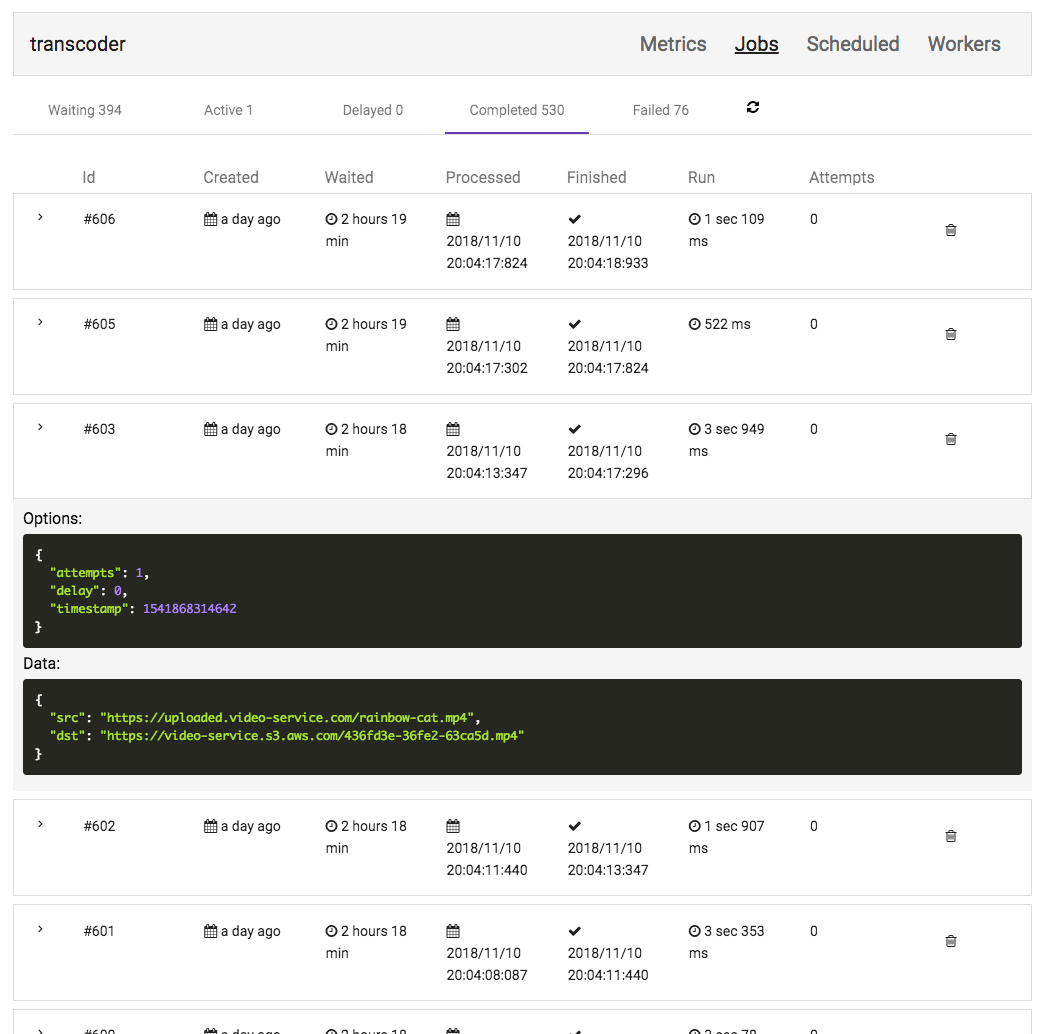
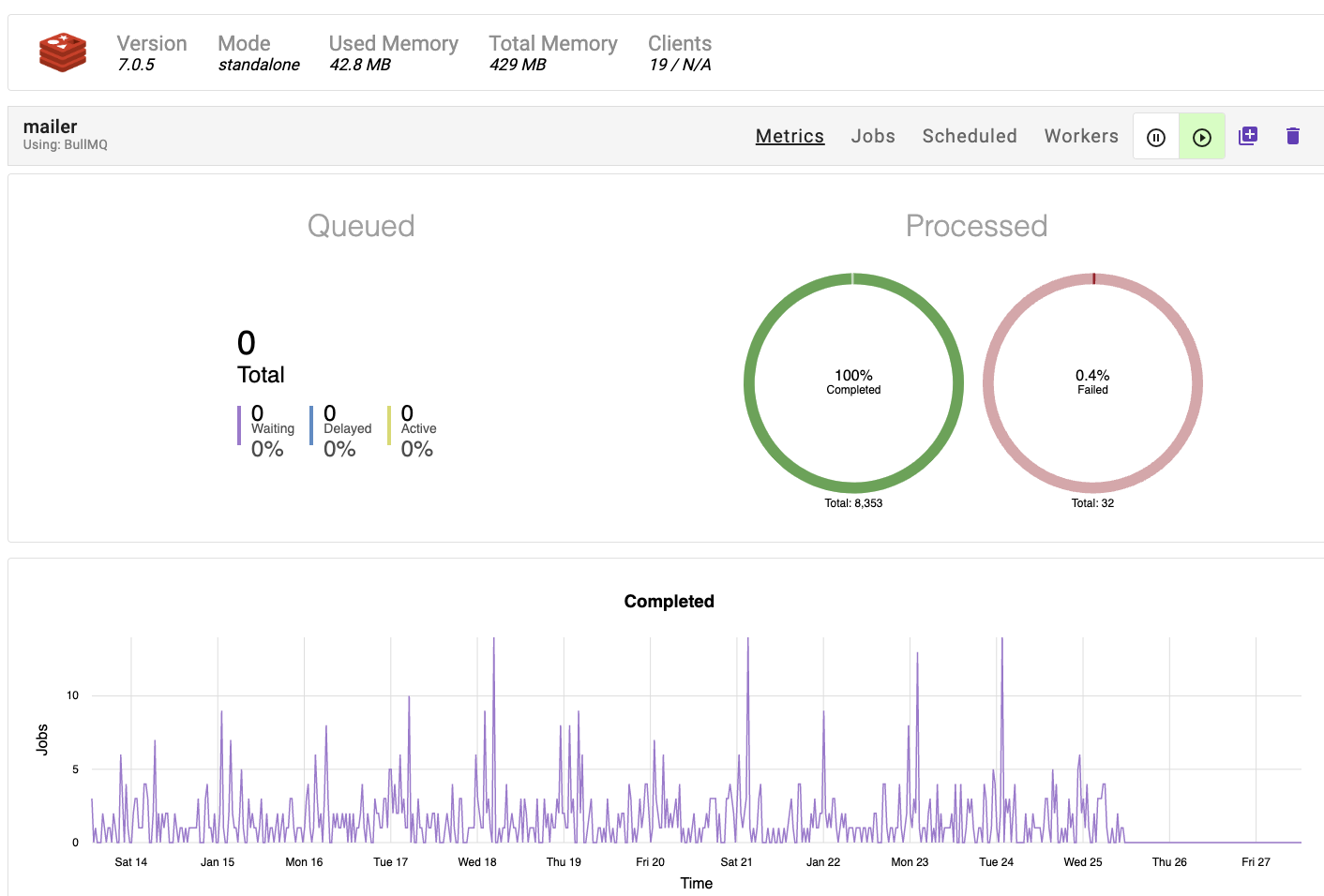
By subscribing to Taskforce.sh, you support the continued development of BullMQ.
Grouping
Assign jobs to groups and set rules such maximum concurrency per group and/or per group rate limits.
Batches
Increase efficiency by consuming your jobs in batches, a strategy that minimizes overhead and can boost throughput.
Use Observables
Implement jobs as observables, enabling more streamlined job cancellation and improved job state management.
Professional support
Access professional support directly from the maintainers of BullMQ, ensuring you have expert assistance when you need it.
import { WorkerPro } from '@taskforcesh/bullmq-pro';const worker = new WorkerPro('myQueue', processFn, {
    group: {
      limit: {
        // Limit to 100 jobs per second per group
        max: 100,
        duration 1000,
      },
      // Limit to 4 concurrent jobs per group
      concurrency: 4,
    },
    connection
});
import { WorkerPro } from "@taskforcesh/bullmq-pro"
import { Observable } from "rxjs"const processor = async () => {
  return new Observable<number>(subscriber => {
    subscriber.next(1);
    subscriber.next(2);
    subscriber.next(3);
    const intervalId = setTimeout(() => {
      subscriber.next(4);
      subscriber.complete();
    }, 500);    // Provide a way of canceling and
    // disposing the interval resource
    return function unsubscribe() {
      clearInterval(intervalId);
    };
  });
};
import { WorkerPro } from '@taskforcesh/bullmq-pro';const worker = new WorkerPro("MyQueue",
  async (job: JobPro) => {
    const batch = job.getBatch();        for(let i=0; i<batch.length; i++) {
        const batchedJob = batch[i];
        await doSomethingWithBatchedJob(batchedJob);
    }
}, { connection, batches: { size: 10 } });
Currently available for Node.js and Bun. More language support coming soon.
Most Popular
Custom
Volume discounts available
- All Standard Features
- Volume Discounts
- Priority Support
- Custom Agreements / MSA
- Payment by POs
Custom
Redistribution rights
- All Enterprise Features
- Embed in your products
- Sell to your customers
* A deployment means a single, distinct operational environment (Kubernetes cluster, server, VM, etc.) connecting to one or more Redis instances.
** Standard license available for organizations with fewer than 100 employees. Larger organizations require Enterprise license.